Reading an LLM bill: line items that actually matter
Most LLM bills get scanned for total cost. Seven line items carry the real signal. A 5-minute monthly review that turns the bill into a diagnostic.
By Ramiro Enriquez
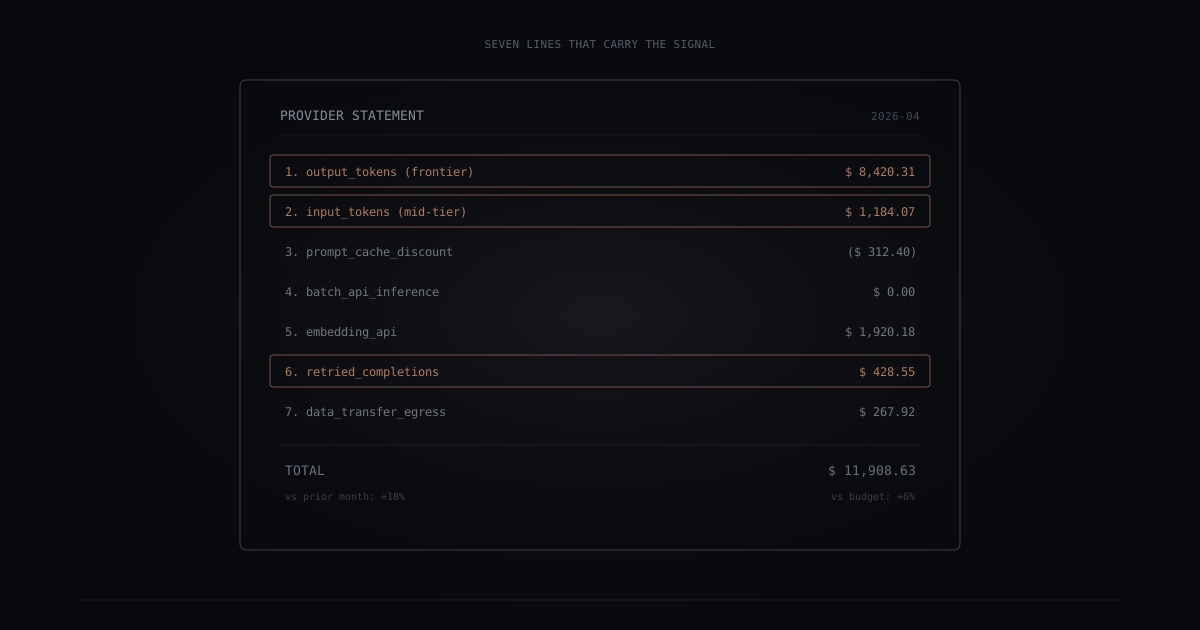
Most LLM provider bills are four to eight columns wide and three to six model SKUs deep. A team running three AI features against two providers can produce a monthly statement that takes a spreadsheet to reconcile. The bill is not a usage summary. It is a pricing-model artifact.
Most teams scan it for total spend and move on. The seven numbers that actually matter never get pulled out, because the bill does not group them helpfully.
Here is what to look for.
Why the bill is hard to read
Providers charge on four axes simultaneously: model tier, call type (realtime vs batch), token direction (input vs output), and discount type (caching, volume, pre-purchase commitments). No two major providers use the same column headings. One buries the cache discount as a negative entry under the same SKU. Another surfaces it as a separate credit line. Batch pricing may be a distinct product or a discount modifier on the realtime SKU.
The result is that two bills for the same workload from different providers cannot be directly compared without normalizing to a common schema. Most teams do not normalize. Once you know which seven lines carry signal, the bill becomes a diagnostic in five minutes.
The seven line items
1. Input vs output tokens
Every bill splits token spend by direction: tokens you sent in, tokens the model returned. Output tokens cost roughly 3 to 5x more than input tokens on most providers, and more on frontier-tier models.
What to check. The ratio of output spend to input spend in dollar terms. Above 2:1 is normal. If output dominates, look at whether responses are longer than necessary. Most teams optimize prompt length. Output length moves more money. Switching a high-volume operation from prose answers to structured JSON output typically reduces output tokens by 20-40% with no quality change on classification or extraction tasks.
2. Model mix
A bill with one SKU tells you something. A bill with three or four tells you more. Each model identifier is a decision: was this model the right one for the calls it handled?
What to check. The percentage of total cost from your most expensive SKU. If a frontier-tier model accounts for 80% of spend, ask whether 80% of your calls genuinely required frontier-tier reasoning. Most production systems have at least one high-volume, low-complexity operation (classification, extraction, formatting) that survives a move to a mid-tier model with no measurable quality change. Run that operation on a smaller model against your golden set. If quality holds, you have your next routing rule.
3. Cache hit rate (or the discount line)
Most major providers now offer prompt caching at a discount. Static prompt prefixes that repeat across requests are billed at a reduced rate, or appear as a separate credit on the bill.
What to check. The size of the cache discount relative to your input token spend. If your discount line is less than 5% of your bill, caching is not working for you. A healthy RAG system or conversational assistant with a long system prompt can often see prompt caching cut input cost by 20-40%. The fix is usually structural: reorganize prompts so static content (instructions, examples) precedes dynamic content (retrieved context, user input). The cache hit rate moves immediately on that change.
Most teams optimize the prompt. Output length and cache structure move more money than either.
4. Batch vs realtime
Non-realtime work does not need the realtime endpoint. Major providers offer batch APIs at significant discounts (commonly around 50% off) for work that tolerates a turnaround window of minutes to hours.
What to check. Whether a batch line exists on your bill at all. If everything is on the standard realtime endpoint, audit your scheduled jobs. Nightly summarization, evaluation runs, data enrichment backfills, and offline classification are batch-appropriate by definition. Moving one nightly pipeline to the batch API at half the rate is a one-line config change with no application-visible tradeoff.
5. Embedding spend
Embedding API calls are cheap per call but accumulate fast in retrieval systems, especially when embedding fires on read as well as on write.
What to check. The ratio of embedding spend to total inference spend. In a healthy RAG system, embeddings sit at roughly 5-15% of total. Above 20% means you are probably re-embedding content that has not changed, embedding at query time when a cached embedding would serve, or running embeddings on intermediate artifacts. The most common cause is re-embedding documents on every retrieval call instead of caching ingestion-time embeddings. A document does not need to be embedded again unless its text changed.
6. Failed and retried calls
Providers differ on whether failed completions are billable. Some charge for tokens submitted even when the completion fails. Some retry internally within their SDK and surface only the final result, billing the aggregate.
What to check. Compare the provider request count to your application’s count. If the provider count is more than 5% above what your application thinks it called, retries are inflating your bill silently. Set max_retries explicitly in your SDK rather than relying on the default. Log provider request IDs and match them against your application traces. Unexplained request-count inflation is a signal to investigate, not normalize away.
7. Egress and data transfer
If you self-host an open-weights model on a cloud, or use a managed hyperscaler service, data transfer can appear alongside inference on the bill.
What to check. Any data transfer or egress line not labeled inference. On self-hosted deployments, spiky traffic produces disproportionate egress because large response payloads (long completions, retrieved chunks) cross network zones. On hyperscaler services, the inference and network bills may be presented together; pull them apart. If egress exceeds 10% of model-related spend, look at whether long completions can be truncated server-side, whether retrieval is returning more context than the model uses, and whether cross-region routing is necessary.
The 5-minute monthly review
Run this on the first business day of each month against the bill export. Six numbers, five minutes.
| Check | What to measure | Investigate when |
|---|---|---|
| Total spend | This month vs last month, vs budget | More than 20% above plan |
| Top model share | % of total cost from most expensive SKU | Above 70% |
| Cache effectiveness | Cache discount as % of input token spend | Below 10% |
| Batch ratio | Batch API spend as % of inference spend | Zero when scheduled jobs exist |
| Embedding ratio | Embedding spend as % of inference spend | Above 20% |
| Request-count delta | Provider count vs application count | Provider count > 5% above application |
None of these thresholds are hard limits. They are triggers for a conversation, not alarms. Egress (line item 7) is the seventh check, conditional on whether you self-host or use a hyperscaler service that bundles inference and network charges.
Where to start tomorrow
Pull last month’s bill. Write down the six numbers above. If you cannot find one of them, that gap is itself information. The line item is either missing from the provider’s reporting (check the export format, not the dashboard summary), or you are not emitting the application-side telemetry needed to calculate the delta.
The application-side numbers (request count by operation, cost per operation, tenant attribution) come from Layer 1 of the four-layer telemetry stack. If you have not instrumented Layer 1 yet, that is the prerequisite. The bill review reads in five minutes once Layer 1 is in place. Without it, the bill is the only ground truth you have, and the bill is too coarse to act on.
This is the kind of monthly read Zylver Meter automates for teams that prefer to spend the five minutes on the decisions, not the math.
The takeaway
The total on your LLM bill is the wrong number to look at first. The seven line items behind it are where the money lives.
Related reading
- Why your AI gets more expensive over time (and how to reverse it). The action layer for what you find in the bill: distillation, model routing, prompt compression, and the rest of the cost-reduction toolkit. Read it next month, after you have the seven numbers.
- What to instrument when your AI degrades in production. The application-side telemetry that turns the bill from a backward-looking statement into a forward-looking control loop.
Zylver ships AI products: Forge, Signal, Agents, Flows, and Meter. View all products.
More from Zylver
What your board needs to know about AI
Boards are being asked to provide oversight on AI at a moment when most board members lack the background to evaluate what they are hearing. The gap between what boards need to know and what they typically get in management presentations is real and consequential.
How AI is changing customer service
Customer service is one of the business functions most visibly transformed by AI. The changes are happening faster than most organizations planned for, and the outcomes depend heavily on implementation decisions that are easy to get wrong.
How to scale AI adoption from one team to the whole organization
Getting AI to work in one team is a different challenge from scaling it across an organization. What worked for the first team often fails when applied elsewhere, and the failure mode is usually invisible until the expansion is already stalled.
Get insights like this delivered monthly.
No spam. Unsubscribe anytime.