
Every language model call has a context window: a hard ceiling on how many tokens it can hold at once. GPT-4o sits at 128K. Claude is 200K. Gemini went to 1M. The numbers keep growing, and teams keep assuming the problem is solved.
It is not solved. Larger context windows deferred the problem. They did not eliminate it.
What the problem actually is
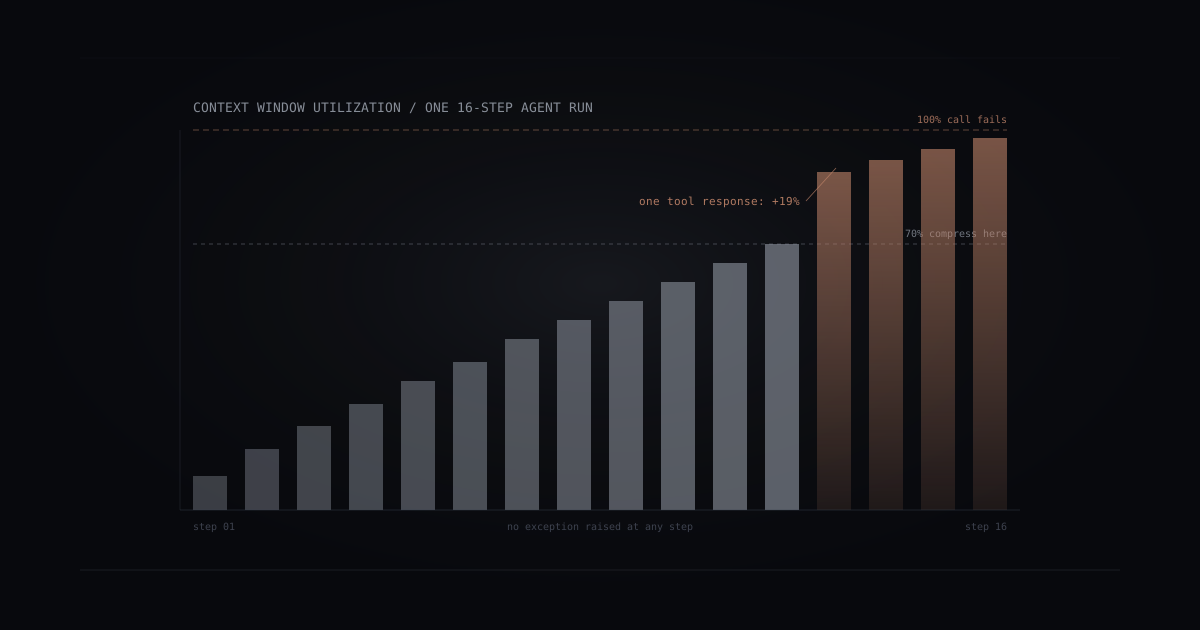
In production, agents do not handle single isolated requests. They carry conversation history, retrieved documents, tool outputs, intermediate reasoning, and accumulated results across multiple steps. Each step consumes tokens. The budget shrinks. At some threshold, usually between 60% and 80% of the available window, the model starts degrading: responses get shorter, earlier context gets ignored, and the agent begins missing things that were stated explicitly ten steps ago. At 100%, the call fails outright.
The failure mode most teams underestimate is not the hard failure. It is the silent one.
When an agent runs out of room without triggering an error, it does not stop and say so. It just begins forgetting. The first casualty is usually the oldest part of the conversation: the original instructions, the constraints that were set at the beginning, the context that made the task coherent. From the outside, the agent still returns responses. They are just subtly wrong in ways that are difficult to trace back to a budget problem.
Why it is worse than it looks
Token counting is deceptive. A 10K-word document might cost 13K tokens after encoding. A tool response that looks like 200 characters in your logs might be 800 tokens when serialized with its schema. System prompts that feel short accumulate to 2K-4K tokens before the first user turn has arrived.
The math on a realistic agent loop looks like this:
- System prompt: 2,500 tokens
- Retrieved context (3 documents at roughly 3K each): 9,000 tokens
- Conversation history (10 turns): 4,000 tokens
- Previous tool outputs (5 calls): 6,000 tokens
- Current user input: 500 tokens
Total before generating a response: 22,000 tokens. On a 128K model, that feels comfortable. Run 15 steps, accumulate outputs, and you are at 80K with no visible warning and no error in your logs.
The agent does not raise an exception at 80K. It quietly starts forgetting the first part of the conversation.
Three patterns that keep budgets from blowing up
1. Track the budget explicitly, at every step
The first pattern is observability: count tokens at each step and treat the budget as a first-class metric, not an afterthought. Most teams log token usage from the API response after the call completes. Few feed that number back into the agent’s decision loop before the next call.
A simple approach: before each tool call or generation step, compute the projected token count of the current context. If it exceeds a threshold (70% of the window is a reasonable starting point), trigger a compression pass before proceeding. Do not wait for the model to start silently degrading.
The compression pass can be as simple as summarizing the oldest N turns of conversation history into a single paragraph, then discarding the originals. The agent retains the semantic content without the raw token cost. Done at 70% rather than 95%, you have enough headroom to generate a useful response after the compression.
2. Separate retrieval from conversation history
Most agents mix two things into a single context: the conversation history that tracks what was said, and retrieved documents that provide factual grounding. Mixing them creates a compounding budget problem. Old retrieved content accumulates in the window even when it is no longer relevant to the current step, because nothing is removing it.
A cleaner pattern: maintain conversation history and retrieved context as separate, managed stores. At each step, re-evaluate what to retrieve for this specific sub-task rather than inheriting whatever was fetched three steps ago. Retrieved context should be ephemeral and step-scoped. Conversation history should be compressed on a rolling basis.
This separation also makes debugging significantly easier. When an agent gives a wrong answer, you can inspect exactly which documents were in scope for that step, rather than digging through a monolithic context blob trying to reconstruct what the model could and could not see.
3. Use structured tool outputs, not natural-language logs
Tool outputs are a surprisingly large and often invisible token source. An agent that calls a search tool and gets back a free-text narrative (“I searched for X and found the following five results, each of which contains…”) consumes far more tokens than one that gets back a structured array with exactly the three fields it needs.
Design tool outputs to be minimal and typed. If the agent only needs title, url, and summary from a search result, return only those three. Strip everything else at the tool layer, not inside the model’s context. A 500-token tool response the model has to parse is worse than a 50-token response it can use directly.
This also means your tool interfaces become part of your budget strategy. The question “what does this tool return?” is the same question as “how many tokens does each call cost?” Treat tool schema design the same way you treat database schema design: specificity is a feature, not a constraint.
The monitoring gap
Most AI cost dashboards show total token spend per run or per day. Few show token-per-step distribution across an agent run, or flag when a single tool call consumed 20% of the available budget.
Without per-step visibility, the budget problem stays opaque. You know the bill is high. You do not know which step caused it, or at what step the model started degrading.
Useful budget monitoring needs two things: a per-call counter that logs input tokens, output tokens, and cache hits; and a per-run aggregation that shows how context window utilization grew across steps. The second is harder to instrument and far more actionable. A chart showing “context window utilization across a 20-step agent run” tells you more about system health than the total cost per run.
The pattern to watch for: a run where utilization climbs steadily to 70%, then spikes to 90%+ on a single step. That spike is usually a tool response that was not designed with token cost in mind. The fix is almost always at the tool layer, not in the model.
Where to start
If you are building agents that run more than five steps, start with explicit budget tracking at the agent loop level. Count tokens before each step. Surface that number in your logs. Set a 70% threshold and test what happens when you hit it.
If you are already hitting context limits in production, the fastest fix is usually compressing conversation history: replace old turns with a rolling summary, and reduce the oldest context to a paragraph every N turns. This is more effective per engineering-hour than switching to a larger model.
Switching to a larger context window is the last resort, not the first move. A million-token window lets you defer the problem for longer. It does not make you stop accumulating tokens, and it does not make the silent degradation any easier to detect when you eventually get there.
The budget problem is a production problem, not a research problem. It shows up at step 12, not step 1, which is exactly why it is so easy to miss in testing and so expensive to find out about in production.